

4Media DVD Creator for Mac Guide
4Media DVD Creator for Mac can help you create DVD movies from video files in AVI, MPEG, VOB, DAT, M2V, MPG as well as many other formats. Here is a quick step-by-step guide to get you started.
Part 1: Getting Started
Part 2: Customize Video Files
First, download, install and launch 4Media DVD Creator for Mac.
How to convert/burn AVI, MPEG, VOB, DAT, M2V, MPG to DVD discs on Mac?
Here, we will show you the simplest and the quickest way to create a DVD from video files.
Step 1: Load video files
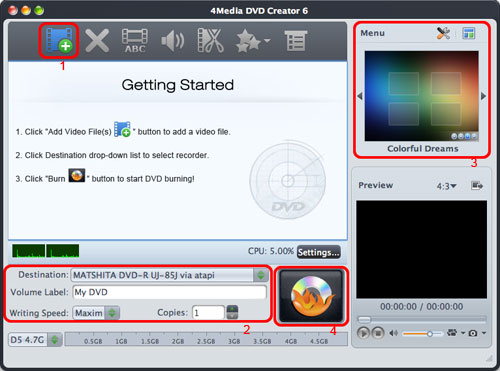
Click the "Add Video File(s)" button on the Toolbar or select "File > Add Video File(s)..." from the drop-down menu to load the video files you wish to burn.
Alternatively, select "File > Add Video Folder..." from the drop-down menu to choose a folder and load all the video files in the folder into the File List.
Step 2: Adjust output settings
Destination: Insert a recordable disc, and select the disc you have inserted from the drop-down list. Alternatively, choose "Save as DVD Folder" or "Save as Image (.iso)" to create a DVD folder or ISO image for the selected file(s) respectively.
Volume Label: Enter a text in the textbox to give your DVD movie a name.
Writing Speed: Choose an appropriate speed from the drop-down list according to your CPU configuration.
Copies: Click the up and down arrows or enter a number directly into the textbox to set the number of copies you wish to burn. Note: if you choose to burn more than 1 copy, then the program will prompt you to insert a new recordable disc after burning each DVD copy.
Step 3: Create DVD menu
Click the "Templates" button on the Menu panel near the top-right corner of the main interface to bring up the Menu Templates window, and then select a template for your movie.
Click the "Edit" button next to the "Templates" button to bring up the Menu Edit window, from there you can change the template, add background music/picture, title and opening film to your menu.
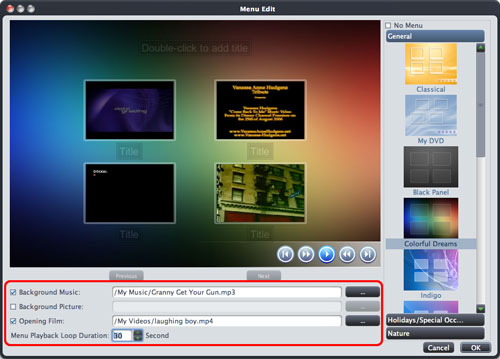
Tick the "No Menu" box if you choose not to include a menu in your movie.
Step 4: Start creating DVD
Click the "Burn" button below the File List to start burning the selected file(s).
Tips:
1. If you want customize your video file further before burning, please refer to "Part 2: Customize Video Files".
2. You can preview a video file with the built-in player at the bottom right of the main interface and take a snapshot at any time whilst previewing. To do this: select a file in the File List and click the "Play" button to play the file, when the video jumps to the image you like, click the "Snapshot" button to capture the image and save it in the snapshot folder.
1. Add subtitles
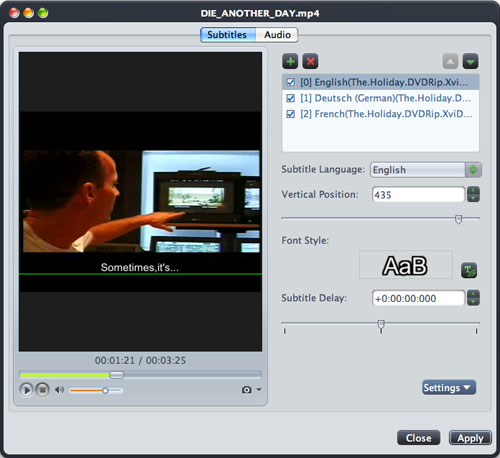
Step 1: Select a video file from the File List, and then click the "Subtitles" button on the Toolbar to bring up the Subtitles window. Click the "+" sign on the right panel and choose the subtitle file you wish to add in the dialog that opens, the subtitle file will then be displayed in the Subtitle List. You can add up to 32 subtitle files per video.
Step 2: Select a subtitle from the Subtitle List, and then choose a language from the "Subtitle Language" drop-down list. You can also adjust the vertical position and the font style of the subtitle accordingly.
Step 3: If the subtitle is not in synch with the video, you can drag the "Subtitle Delay" slider left or right, enter the delay time in the text box, or click the up or down arrow keys to increase or decrease the delay time respectively.
Step 4: If you wish to set this subtitle as the default subtitle when the DVD is played, click the up arrow key above the Subtitle List repeatedly to move it to the top of the list.
Step 5: Click "Apply" and "Close" to save the changes and return to the main interface.
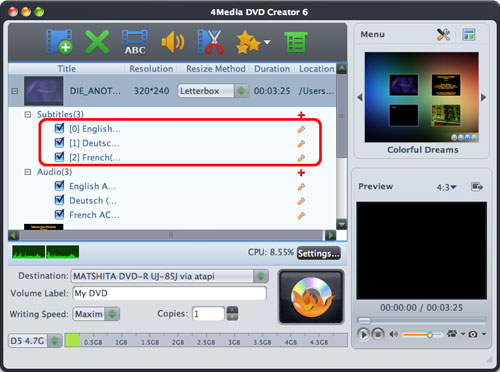
Click the "+" sign before the video file to expand its subtitle items, the subtitles you have just added will be displayed. You can add a subtitle file by clicking on the "+" sign ("Add Subtitles...") to the right of the subtitle item and edit it by clicking on the "Edit Subtitles" button.
2. Add audio tracks
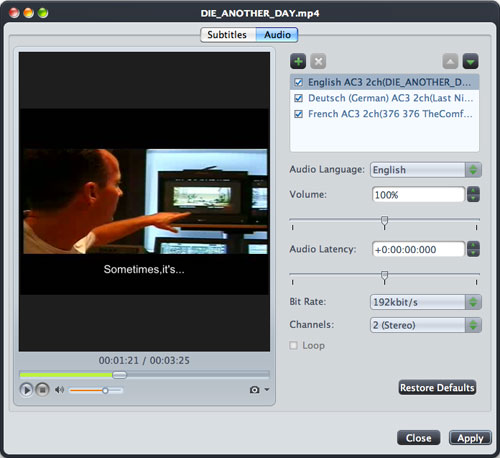
Step 1: Select a video file from the File List, and then click the "Audio" button on the Toolbar to bring up the Audio window. Click the "+" sign on the right panel and choose the audio file you want to add in the dialog that opens, the audio file will then be displayed in the Audio Track List. You can add up to 8 audio tracks per video.
Step 2: Select an audio track from the Audio Track List, and then choose a language from the "Audio Language" drop-down list. You can also adjust the volume, bit rate and channel type of the audio track accordingly.
Step 3: If the audio track is not in synch with the video, you can drag the "Audio Latency" slider left or right, enter the delay time in the text box, or click the up or down arrow keys to increase or decrease the delay time respectively.
Step 4: If you want to set this audio track as the default audio track when the DVD is played, click the up arrow key above the Audio Track List repeatedly to move it to the top of the list.
Step 5: Click "Apply" and "Close" to save the changes and return to the main interface.
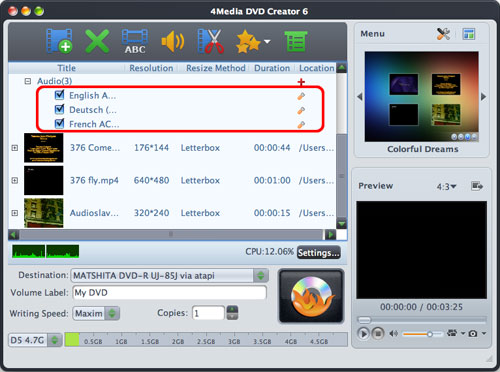
Click the "+" sign before the video file to expand its audio track items, the audio tracks you have just added will be displayed. You can add an audio track by clicking on the "+" sign ("Add Audio Track...") to the right of the audio track item and edit it by clicking on the "Edit Audio Track" button.
3. Clip video file
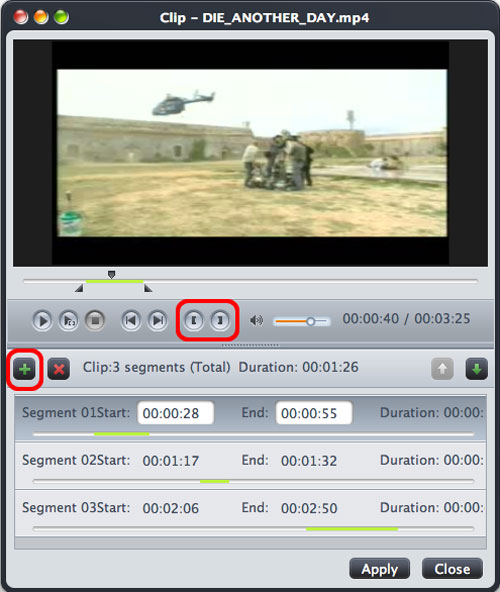
Step 1: Select a video file from the File List, and then click the "Clip" button on the Toolbar to open the Clip window.
Step 2: You can clip a segment in one of two ways:
a) Click the "Play" button to play the video. Click the "Set Start Point" button at any time to set the start point for the segment; set the segment end point by clicking "Set End Point" at any time. A new segment will then be added to the Segment List below.
b) Alternatively, scroll the video to the start point of the segment you want to clip, and then click "Set Start Point". Next, scroll the video to the end point of the segment, and then click "Set End Point". A new segment will then be added to the Segment List below.
Step 3: Click the "New Clip" button above the Segment List, and then repeat Step 2 to get a new segment. Repeat this process to extract as many segments as you want.
Step 4: Click "Apply" and "Close" to save the changes and return to the main interface. All the segments you have extracted will be merged into a new video file in place of the original one ready to be outputted.
4. Add effects

Step 1: Select a video file from the File List, click the "Effect" drop-down button, and then select the "Effect..." option from the drop-down list to bring up the Effect window.
Step 2: From the "Effect" tab, tick the effects you want from the list. Click the up and down arrows keys to adjust the order of the effects.
5. Crop video size
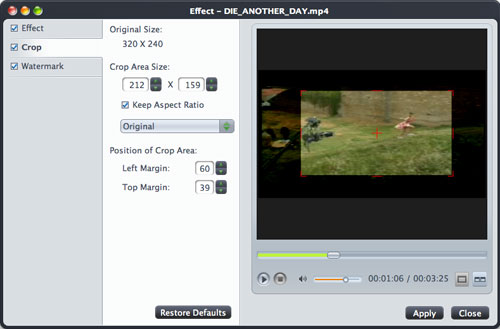
Step 1: Select a video file from the File List, click the "Effect" drop-down button, and select the "Crop..." option from the drop-down list to bring up the Effect window.
Step 2: From the "Crop" tab, enter the height and width of the crop area in the corresponding textboxes below the "Crop Area Size" label to set the crop area. Enter the values of Left Margin and Top Margin in the corresponding textboxes below the "Position of Crop Area" label to adjust the position of the crop area. Choose an aspect radio from the "Keep Aspect Ratio" drop-down menu.
Tip: You can also adjust the position and the size of the crop area by clicking and dragging the central and surrounding red handles in the preview window.
6. Add watermarks
Step 1: Select a video file from the File List, click the "Effect" drop-down button, and select the "Watermark..." option from the drop-down list to bring up the Effect window.
Step 2: To add a text watermark, click the "Add Text Watermark" button near the top of the window, and input the content of text watermark. You can also adjust various settings for your text watermark from there.
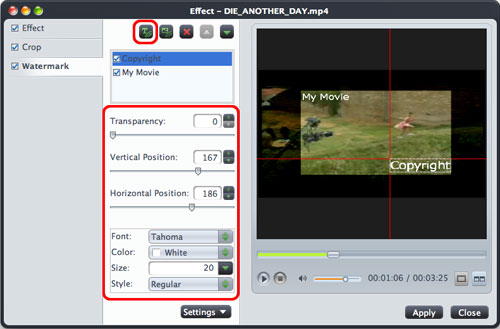
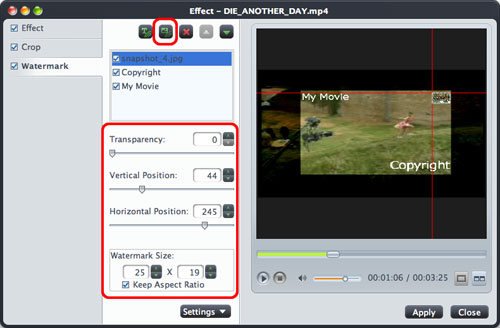
To add a picture watermark, click the "Add Picture Watermark" button, and locate a picture from your Mac as your picture watermark in the dialog that opens. You can also adjust various settings for your picture watermark.
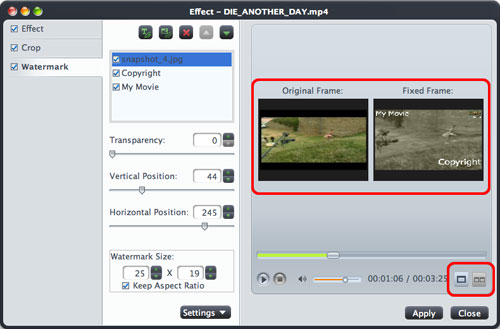
Tip: You can click the "Comparing Preview" button on the bottom left of the Effect window at any time to preview the original video and the video with various effects applied side by side in real-time.

Featured Guides
Guides Categories
Video/Audio Guides
- 4Media Audio Converter Pro Tutorial
- 4Media Movie Editor 6 Tutorial
- Video Converter Ultimate Tutorial
- How to convert DAT to other videos
DVD/CD/Blu-Ray Guides
- 4Media Blu Ray Converter for Mac Tutorial
- How to convert Blu-ray disc to video files
- How to burn AVI, MPEG, VOB, DAT, M2V, MPG to DVD on Mac
- How to burn DivX to DVD on Mac
iPod Guides
- 4Media iPod Max Guide
- How to convert AVI, MPEG to iPod MP4 format
- Guide: 4Media iPod to PC Transfer
- How to convert DVD to iPod on Mac
iPhone Guides
- 4Media iPhone Contacts Transfer for Mac Tutorial
- 4Media iPhone Contacts Transfer Tutorial
- 4Media iPhone Ringtone Maker for Mac Tutorial
- 4Media iPhone Max Guide
iPad Guides
Youtube/Online Video Guides
- 4Media Online Video Converter for Mac Guide
- 4Media Online Video Downloader for Mac Guide
- 4Media Online Video Converter Guide
- 4Media Online Video Downloader Guide
PPT/PDF Guides
Others
Articles
- How to download YouTube videos for free
- How to download/convert YouTube videos to iPod
- How to download and convert YouTube videos
- All features of apple iPhone
- Now you can get more TV offerings from Apple iTunes
- Video Streamer HAVA from Snappy Multimedia
- iPod Growth Driving Demand for Flash Memory
- MediaMan HVX-3500 Review
- Uncertain whether new iPod will be delayed or not because of hurdles
- T3's top five iPod alternatives
- Envivio Exhibits MPEG-4 Solutions from Mobile to HD at CCBN2006